Introducing question groups: structure, randomize, and route your studies
Organize questions into groups and subgroups, randomize their order to eliminate bias, and route skip logic to whole sections, in text and voice interviews alike.
Until now, every Versive study was a flat list of questions. That works fine for short studies, and falls apart for the studies researchers actually run: a screener, three concept sections that should rotate, and a wrap-up.
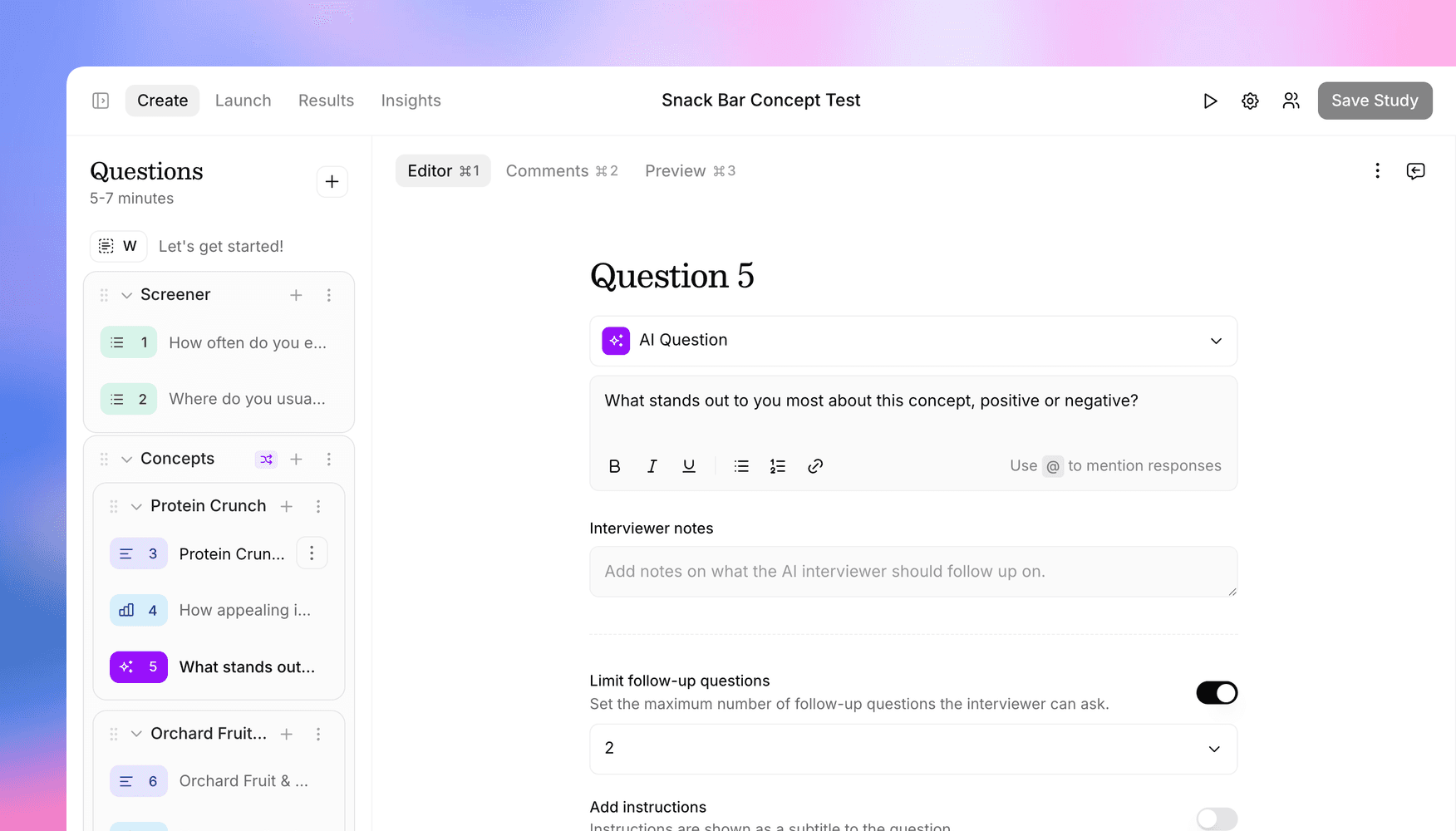
Today we're launching question groups: organize your questions into named sections, randomize their order per participant, and point skip logic at whole groups instead of individual questions.
Structure your study the way you think about it
In the study editor, you can now create groups (and one level of subgroups) right from the sidebar. Drag questions in and out, drag whole groups to reorder them, rename them inline, and manage a section as a unit. Question numbering stays sequential across the whole study, so "Question 7" means the same thing to you, your team, and the participant.
Groups are organizational scaffolding for you, not friction for participants: interviews flow straight through them, and the progress bar accounts for grouped questions correctly.
Randomize to eliminate order bias
Any group can shuffle the order of its children (questions or entire subgroups) independently for each participant. Showing three pricing concepts? Put each concept's questions in a subgroup, randomize the parent group, and every participant sees the concepts in a different order. You can pin specific items in place, so an intro question can stay first while everything after it rotates.
Randomization is stable per participant: if someone drops off and resumes their interview later, they see the same order they started with.
Route logic to a section, not a question
Skip logic gets a new action: move to question group. "If they've never used the feature, skip the whole deep-dive section" is now one rule instead of a chain of per-question jumps, and it keeps working even as you add questions to the target group later.
Works everywhere, including the AI
Groups and randomization behave identically in text and voice interviews. And the AI study creator understands them end to end: describe a study with sections and rotation in a prompt, and it builds the grouped structure for you, or reorganizes an existing study into groups. The same capabilities are available through the public API, so programmatic workflows aren't left behind.
Question groups are available now for all studies. Look for Add group in the study editor's questions sidebar.
Get in touch
We're continuing to build features that help you learn faster. If you have any questions or feature requests, reach out to us at [email protected]. Want to give it a try? Start a free trial and start running research in minutes.

Eric Li, Co-Founder, Versive